
• Home
  • Advertise With Us
  • Latest Education News
    • Teachers’ Resources
    • Teachers’ Resources
    • TSC News Portal
    • KUCCPS portal
    • KCSE Revision Materials
    • KUCCPS portal
    • KMTC News Portal
    • KSSSA Portal
    • Universities & Colleges information
  • NSSF PORTAL
  • NTSA Service Portal
  • KRA Portal
  • Tech News
Newsblaze.co.ke
  • Home
  • Advertise With Us
  • Latest Education News
    • Teachers’ Resources
    • Teachers’ Resources
    • TSC News Portal
    • KUCCPS portal
    • KCSE Revision Materials
    • KUCCPS portal
    • KMTC News Portal
    • KSSSA Portal
    • Universities & Colleges information
  • NSSF PORTAL
  • NTSA Service Portal
  • KRA Portal
  • Tech News
  • HELB Portal
  • Crimes and Courts
  • Health & Nutrition tips
  • Insurance news
  • Jobs
No Result
View All Result
  • Home
  • Advertise With Us
  • Latest Education News
    • Teachers’ Resources
    • Teachers’ Resources
    • TSC News Portal
    • KUCCPS portal
    • KCSE Revision Materials
    • KUCCPS portal
    • KMTC News Portal
    • KSSSA Portal
    • Universities & Colleges information
  • NSSF PORTAL
  • NTSA Service Portal
  • KRA Portal
  • Tech News
  • HELB Portal
  • Crimes and Courts
  • Health & Nutrition tips
  • Insurance news
  • Jobs
No Result
View All Result
Newsblaze.co.ke
No Result
View All Result

TSC latest Email Validation Process

by Hillary Kangwana
January 11, 2026
in TSC News Portal
0
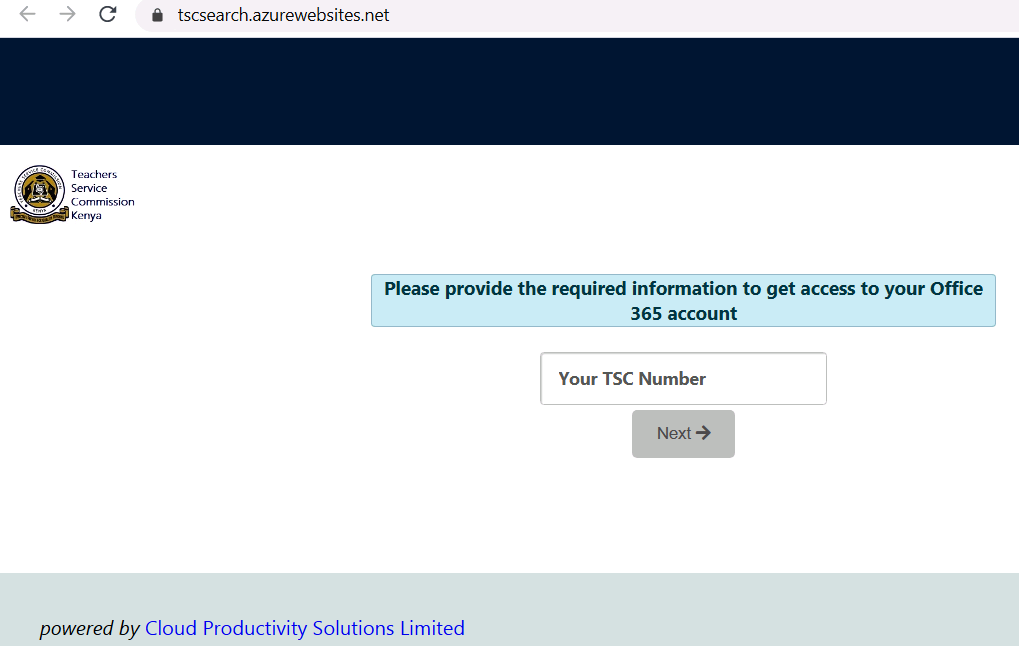
TSC teachers Email activation online at https://tscsearch.azurewebsites.net/

New TSC Email Activation Step by Step Guide.

EMAIL VALIDATION PROCESS

Steps to Follow:

1. Get your email activated here (by 1CT).

2. Access your TSC mwalimu email through TSC Website (tsc.go.ke) => Online Services => Teachers email

3. On the teachers email, enter your tsc email ([email protected])

4. On the next step, => Click Forgot Password.

5. Enter the code sent to your phone number and set your new EMAIL PASSWORD. => proceed to (click here to sign in)

6. Once you are able to access your mwalimu Email Inbox, go to the tsc website (tsc.go.ke) => TPAY

7. Login to your TPAY account => on the email textbox, enter your tsc mwalimu email and lick get code)

8. Go back to your email inbox, copy that tpay validation code sent in your email inboOx.

9.Go back to your Tpay profile, enter the code you copied above to the email validation code text box and click validate

10. Once done, confirm that you can access your pay slips.

Previous Post

Successful bee keeping teacher – Here is the full story

Next Post

Nigeria squad to face South Africa in AFCON qualifier unveiled, Obi Mikel left out

Hillary Kangwana

Next Post

Nigeria squad to face South Africa in AFCON qualifier unveiled, Obi Mikel left out

Categories

  • Advertisement (37)
  • Business News (286)
  • Crimes and Courts (39)
  • Featured News (914)
  • FREE KCPE REVISION MATERIALS (1)
  • Health & Nutrition tips (1,424)
  • HELB Portal (144)
  • Insurance news (34)
  • Jobs (249)
  • KCSE Revision Materials (3)
  • KMTC News Portal (508)
  • Knec & Schools News (31,979)
  • KNUT NEWS (17)
  • KRA Portal (24)
  • KSSSA Portal (418)
  • KUCCPS portal (1,819)
  • KUPPET (24)
  • Latest Education News (27,009)
  • NSSF PORTAL (54)
  • NTSA Service Portal (21)
  • Politics News (4,249)
  • Sports (300)
  • Teachers' Resources (1,941)
  • Tech News (70)
  • TSC Latest News (335)
  • TSC News Portal (2,467)
  • Universities & Colleges information (1,004)
  • Universities and Colleges (403)
  • Home
  • Advertise With Us
  • Latest Education News
  • NSSF PORTAL
  • NTSA Service Portal
  • KRA Portal
  • Tech News

© 2026 JNews - Premium WordPress news & magazine theme by Jegtheme.

No Result
View All Result
  • Home
  • Advertise With Us
  • Latest Education News
    • Teachers’ Resources
    • Teachers’ Resources
    • TSC News Portal
    • KUCCPS portal
    • KCSE Revision Materials
    • KUCCPS portal
    • KMTC News Portal
    • KSSSA Portal
    • Universities & Colleges information
  • NSSF PORTAL
  • NTSA Service Portal
  • KRA Portal
  • Tech News

© 2026 JNews - Premium WordPress news & magazine theme by Jegtheme.