
• Home
  • Advertise With Us
  • Latest Education News
    • Teachers’ Resources
    • Teachers’ Resources
    • TSC News Portal
    • KUCCPS portal
    • KCSE Revision Materials
    • KUCCPS portal
    • KMTC News Portal
    • KSSSA Portal
    • Universities & Colleges information
  • NSSF PORTAL
  • NTSA Service Portal
  • KRA Portal
  • Tech News
Newsblaze.co.ke
  • Home
  • Advertise With Us
  • Latest Education News
    • Teachers’ Resources
    • Teachers’ Resources
    • TSC News Portal
    • KUCCPS portal
    • KCSE Revision Materials
    • KUCCPS portal
    • KMTC News Portal
    • KSSSA Portal
    • Universities & Colleges information
  • NSSF PORTAL
  • NTSA Service Portal
  • KRA Portal
  • Tech News
  • HELB Portal
  • Crimes and Courts
  • Health & Nutrition tips
  • Insurance news
  • Jobs
No Result
View All Result
  • Home
  • Advertise With Us
  • Latest Education News
    • Teachers’ Resources
    • Teachers’ Resources
    • TSC News Portal
    • KUCCPS portal
    • KCSE Revision Materials
    • KUCCPS portal
    • KMTC News Portal
    • KSSSA Portal
    • Universities & Colleges information
  • NSSF PORTAL
  • NTSA Service Portal
  • KRA Portal
  • Tech News
  • HELB Portal
  • Crimes and Courts
  • Health & Nutrition tips
  • Insurance news
  • Jobs
No Result
View All Result
Newsblaze.co.ke
No Result
View All Result

TSC TPAD 2 Lesson observation request creation and filling observation form online for teachers

by Hillary Kangwana
January 9, 2026
in TSC News Portal
0
New TPAD 2 portal by TSC.

The TSC TPAD2 Dashboard and how to create a new appraisal on TPAD 2.

Did you know that it is mandatory for you to have a lesson observation on TSC TPAD 2 system, at least once in a term? Yes. For your TPAD 2 online form to show a processing status of hundred percent the appraiser must carry out the lesson observation in class and fill the lesson observation form online.

HOW TO CREATE A REQUEST FOR LESSON OBSERVATION ON TPAD 2

You can easily create a lesson observation request on your TSC TPAD 2 account. The request can be generated by either the appraisee (yourself) or the appraiser.

HOW THE APPRAISEE CAN GENERATE A LESSON OBSERVATION REQUEST ON TPAD 2

Creating your own lesson observation request is easy and straight forward. You can either use your mobile phone or a computer. Follow the steps below;

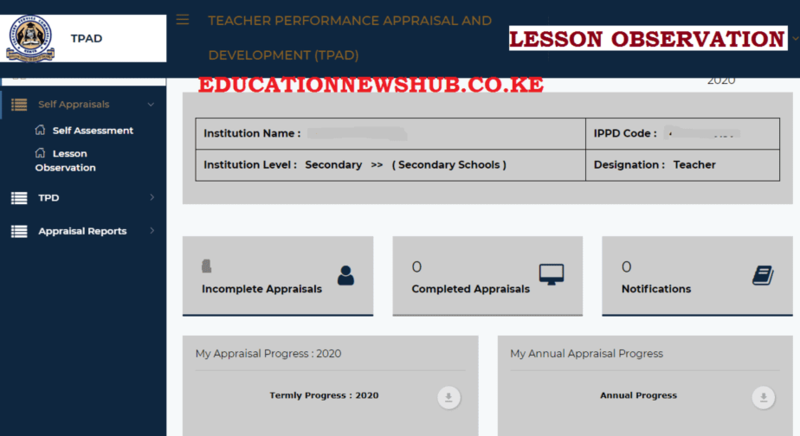
  1. First, log into your TSC TPAD 2 account. From the Dashboard, select ‘Self Appraisals’ followed by ‘Lesson Observation’. See screenshot below.
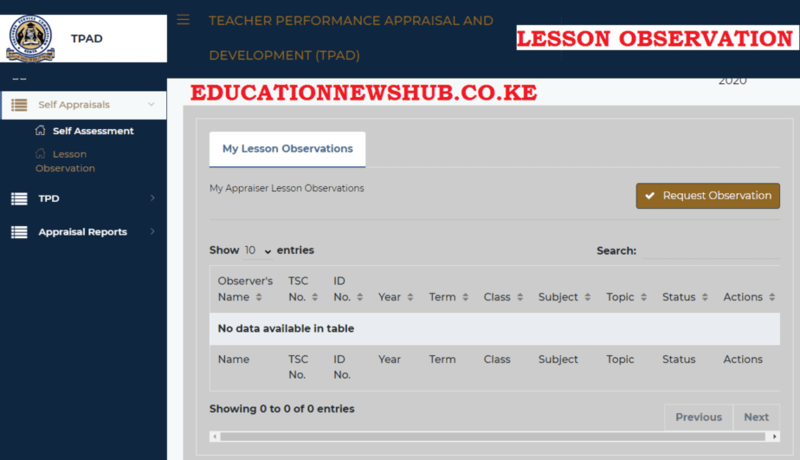
2. On the new window (see below), click ‘Request Observation’. This will generate the ‘Request For Lesson Observation’ dialog box.
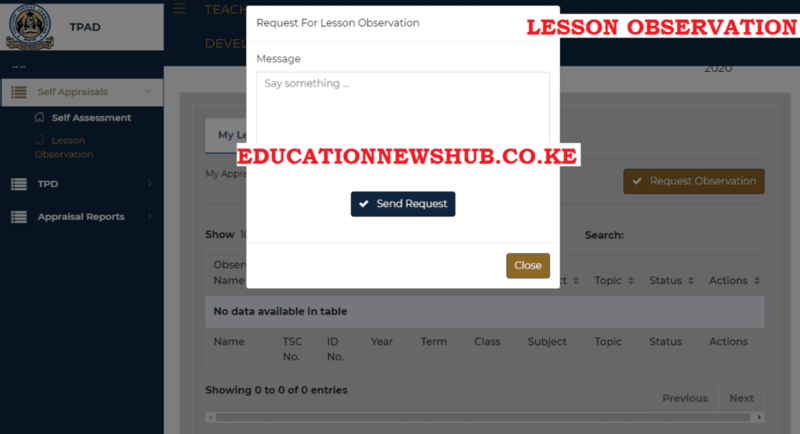
3. Type your message in the Message box (see below). The message to include the form/ class, subject, Subject Topic, Lesson Topic, Number of Learners and Observation date. Click on ‘Send Request’ when done.
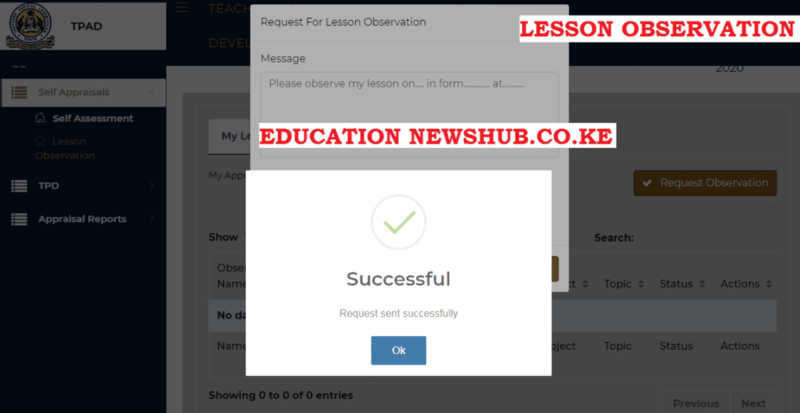
4. A success message will be shown on your screen (See below). Your appraiser will get the notification on lesson observation request.
See also;

  • TSC Lesson Observation Form for teachers: New TPAD 2 free forms downloads
  • TSC TPAD 2 portal guides; http://tpad2.tsc.go.ke/
  • TSC TPAD 2 Lesson attendance data for teachers; Procedure

HOW THE APPRAISER CAN GENERATE A LESSON OBSERVATION REQUEST ON TPAD 2

The appraiser can equally request a teacher for lesson observation. To do this, follow the steps here below;

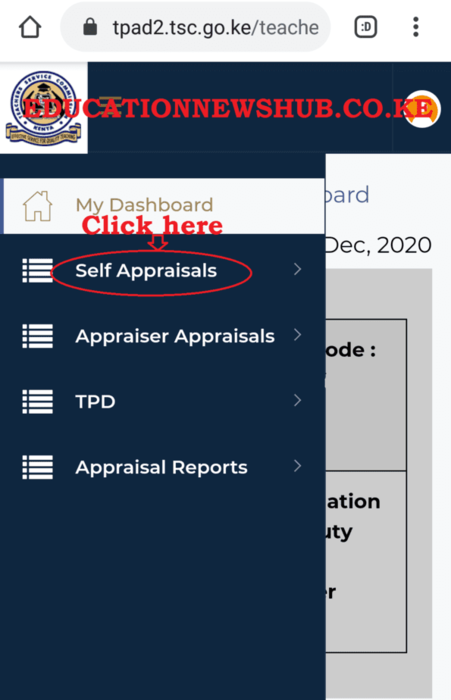
  1. Log onto your TPAD 2 account. From your Dashboard, select ‘Self Appraisals’ as shown below.
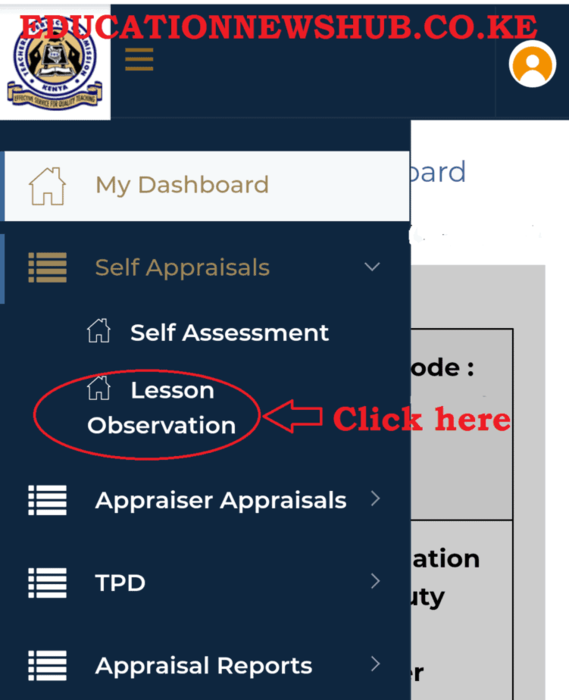
2. Under the Self Appraisals menu, click on ‘lesson Observation’ (See image below).
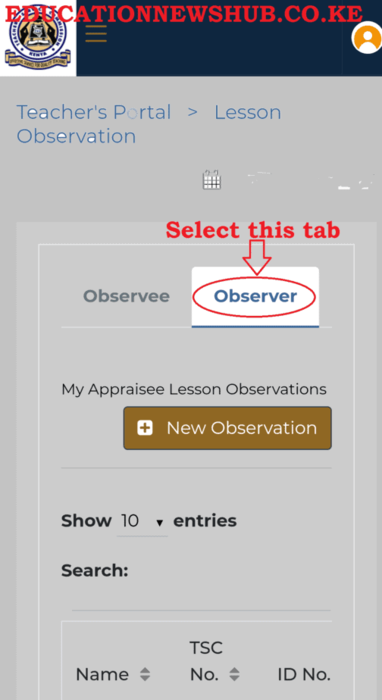
3. Now, on the new window, click on ‘Observer’ as shown in the screenshot below. Then, select ‘New Observation’.
4. Move to teacher for whom you want to create a lesson observation request and click on ‘New Record’.
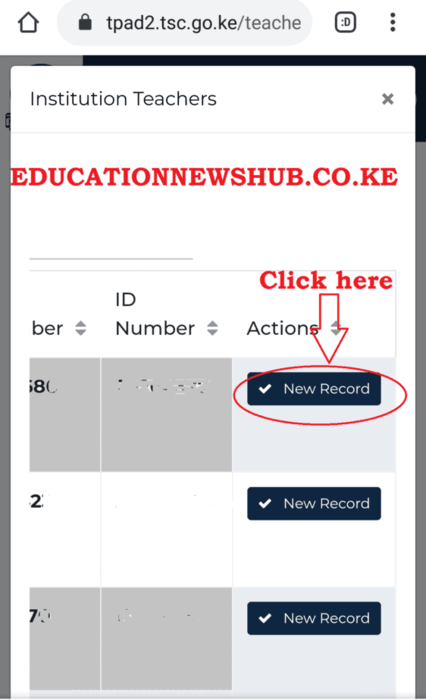
5. A new pop up window will appear like the one shown below. Fill in the details correctly and click on ‘Add Record’ once done.

6. A success message will appear on your screen as the one shown in the image below.

7. A notification will be sent to the appraisee’s inbox. Now you can proceed to fill the lesson observation form after the observation has been made in class.

To complete the lesson observation form online, use the elaborate guide here; How to undertake Lesson Observation in the TPAD 2 Online System

HOW TO COMPLETE THE LESSON OBSERVATION FORM ONLINE.

It is the duty of the appraiser to complete the lesson observation form, online. This is after observing the teacher in class.

To complete the form use the procedure below;

  • Log in
  • Select ‘Lesson Observation’ followed by ‘Create Lesson Observation’.
  • Move to the teacher for whom you want to file his/ her lesson observation records. Select ‘Observe’ at the far right of your screen.
  • You will get the form below. Fill it correctly and click on ‘Save Observation Marks’, when done.
THE TEACHER’S LESSON OBSERVATION FORM ONLINE.

Lesson Observation Areas

1. Introduction and Lesson Organisation
Performance Indicators Max Score Observer’s Score Observer’s Comment
Review of the previous lesson/content related to the current lesson 1
State the objective of the current lesson 1
Link the previous lesson to the current lesson 1
Quality of introduction: captivating/capture learners interest 1
2. Content Delivery
Performance Indicators Max Score Observer’s Score Observer’s Comment
summarized the lesson by highlighting the key points 1
Teaching with lesson notes and lesson plan 1
Mastery of content in line with the syllabus 1
Answering of students questions accurately 1
Covering the lesson within the stipulated time (Started on time and ended on time) . 1
3. Teaching Methods/ Techniques
Performance Indicators Max Score Observer’s Score Observer’s Comment
Use of appropriate teaching methods (Question and answer, Demonstration, experimentation, Discussion/Group work, Field work) 1
Use of appropriate teaching/learning aids 1
Use of varied teaching methods 1
Demonstrate innovation and creativity in teaching 1
Ability to simulate learners 1
4. Learner Involvement and Communication.
Performance Indicators Max Score Observer’s Score Observer’s Comment
Answering and asking question 1
Observation 1
discussion and presentation 1
Experimentation / Demonstration / Discussion / Discovery / Question and answer 1
Field work/presentation 1
Discovery/presentation 1
5. Classroom Management
Performance Indicators Max Score Observer’s Score Observer’s Comment
Cleanliness of the classroom 1
Arrangement of desks to enable a teacher to reach an individual student 1
Moving in class to observe students work 1
Marking/checking students in class 1
No chorus answers/knowing learners by name 1


Tags: Latest TSC newsLATEST TSC NEWS 2021TPAD 2 DEADLINETPAD 2 LESSON OBSERVATION PROCEDURETPAD LESSON OBSERVATION FORMTSC BREAKING NEWS ON PROMOTIONS 2021TSC LIST OF PROMOTED TEACHERS 2021TSC news todayTSC NEWS TODAY 2021TSC PAYSLIPS 2021TSC TPAD 2 PORTALTSC TPAD 2 portal; http://tpad2.tsc.go.ke/
Previous Post

St. Patrick’s Iten High Senior School: Full details, location, CBE Subjects Offered

Next Post

Stephen Kositany Girls High School’s KCSE Results, KNEC Code, Admissions, Location, Contacts, Fees, Students’ Uniform, History, Directions and KCSE Overall School Grade Count Summary

Hillary Kangwana

Next Post
STEPHEN KOSITANY GIRLS’ HIGH SCHOOL

Stephen Kositany Girls High School's KCSE Results, KNEC Code, Admissions, Location, Contacts, Fees, Students' Uniform, History, Directions and KCSE Overall School Grade Count Summary

Categories

  • Advertisement (37)
  • Business News (286)
  • Crimes and Courts (39)
  • Featured News (914)
  • FREE KCPE REVISION MATERIALS (1)
  • Health & Nutrition tips (1,424)
  • HELB Portal (144)
  • Insurance news (34)
  • Jobs (249)
  • KCSE Revision Materials (3)
  • KMTC News Portal (508)
  • Knec & Schools News (31,979)
  • KNUT NEWS (17)
  • KRA Portal (24)
  • KSSSA Portal (418)
  • KUCCPS portal (1,819)
  • KUPPET (24)
  • Latest Education News (27,009)
  • NSSF PORTAL (54)
  • NTSA Service Portal (21)
  • Politics News (4,249)
  • Sports (300)
  • Teachers' Resources (1,941)
  • Tech News (70)
  • TSC Latest News (335)
  • TSC News Portal (2,467)
  • Universities & Colleges information (1,004)
  • Universities and Colleges (403)
  • Home
  • Advertise With Us
  • Latest Education News
  • NSSF PORTAL
  • NTSA Service Portal
  • KRA Portal
  • Tech News

© 2026 JNews - Premium WordPress news & magazine theme by Jegtheme.

No Result
View All Result
  • Home
  • Advertise With Us
  • Latest Education News
    • Teachers’ Resources
    • Teachers’ Resources
    • TSC News Portal
    • KUCCPS portal
    • KCSE Revision Materials
    • KUCCPS portal
    • KMTC News Portal
    • KSSSA Portal
    • Universities & Colleges information
  • NSSF PORTAL
  • NTSA Service Portal
  • KRA Portal
  • Tech News

© 2026 JNews - Premium WordPress news & magazine theme by Jegtheme.