• Home
  • Advertise With Us
  • Latest Education News
    • Teachers’ Resources
    • Teachers’ Resources
    • TSC News Portal
    • KUCCPS portal
    • KCSE Revision Materials
    • KUCCPS portal
    • KMTC News Portal
    • KSSSA Portal
    • Universities & Colleges information
  • NSSF PORTAL
  • NTSA Service Portal
  • KRA Portal
  • Tech News
Newsblaze.co.ke
  • Home
  • Advertise With Us
  • Latest Education News
    • Teachers’ Resources
    • Teachers’ Resources
    • TSC News Portal
    • KUCCPS portal
    • KCSE Revision Materials
    • KUCCPS portal
    • KMTC News Portal
    • KSSSA Portal
    • Universities & Colleges information
  • NSSF PORTAL
  • NTSA Service Portal
  • KRA Portal
  • Tech News
  • HELB Portal
  • Crimes and Courts
  • Health & Nutrition tips
  • Insurance news
  • Jobs
No Result
View All Result
  • Home
  • Advertise With Us
  • Latest Education News
    • Teachers’ Resources
    • Teachers’ Resources
    • TSC News Portal
    • KUCCPS portal
    • KCSE Revision Materials
    • KUCCPS portal
    • KMTC News Portal
    • KSSSA Portal
    • Universities & Colleges information
  • NSSF PORTAL
  • NTSA Service Portal
  • KRA Portal
  • Tech News
  • HELB Portal
  • Crimes and Courts
  • Health & Nutrition tips
  • Insurance news
  • Jobs
No Result
View All Result
Newsblaze.co.ke
No Result
View All Result

Updated NEMIS Guide for admitting 2019 form ones for County, Extra County and National schools; including how to place transfer requests

by Hillary Kangwana
January 10, 2026
in Latest Education News
0
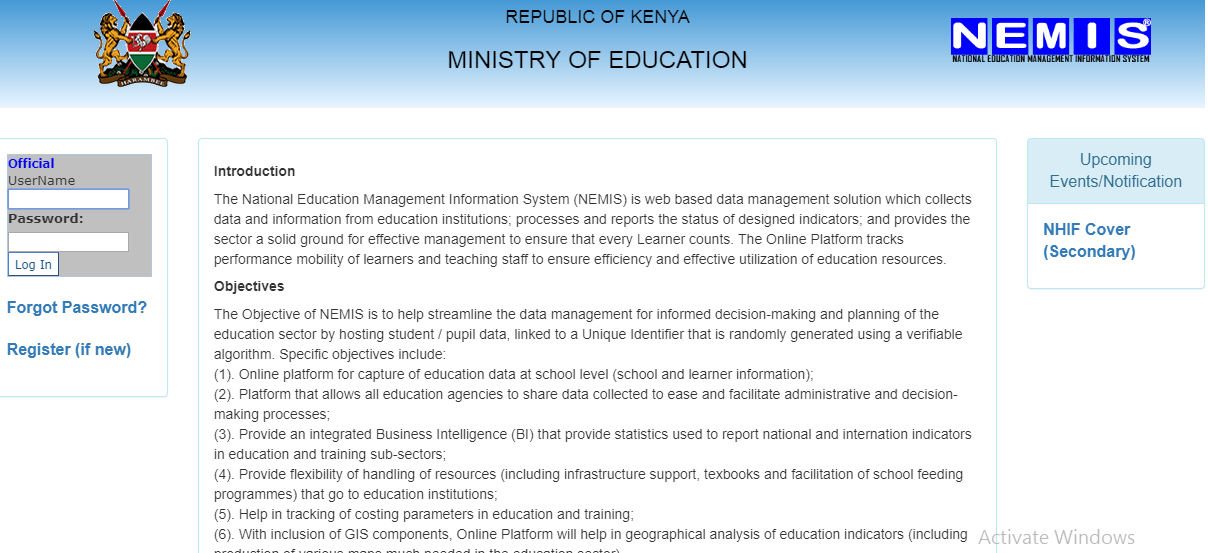
The Ministry of Education's NEMIS portal Log in Screen.

The Ministry of Education's NEMIS portal Log in Screen.

County, Extra County and National schools had placement of their form ones done electronically at the National Education Management Information System, NEMIS. There has been unprecedented confusion on how to transfer a kid from one school to another. The procedure below simplifies the admission process for students including those with transfer requests.

HOW TO PLACE A PLACEMENT TRANSFER REQUEST FOR STUDENT

  1. Visit the NEMIS portal at https://nemis.education.go.ke
  2. Log onto the system by providing the User name and password.
  3. Under the ‘LEARNER’ tab, select ‘Admit/ Capture requests’ from the drop down menu.
  4. On the new window, enter the Learner’s Index number or Unique Personal Identifier (UPI) into the ‘SEARCH (UPI/ INDEX) box and press on ‘Check.’ The learner’s details will be displayed i.e Index, Name, Gender, Marks and the School that the student has been placed.
  5. Accept placement request and fill the Parent or Guardian’s name, ID no, mobile contact and request number/ File Number as captured in the school’s list. Click on apply.
  6. A success message is displayed. Wait for approval of the transfer request to be effected. This may take up to one day. Approval is done at various levels of the Ministry of Education’s administrative units i.e County for county schools, Region for Extra County schools and the Ministry’s Head quarter (Jogoo) for National schools.

Note: Send documentary evidence for the transfer request to the Ministry of Education’s Director- Secondary Schools, on E-mail: [email protected]

THE ADMISSION PROCEDURE:

  1. Visit the NEMIS portal at https://nemis.education.go.ke/
  2. Log in by using the set User name and Password.
  3. Once logged in, select the LEARNER TAB and click on ‘Admit student/ Capture request from the drop down list.
  4. On the new window, enter the Learner’s Index number or Unique Personal Identifier (UPI) into the ‘SEARCH (UPI/ INDEX) box and press on ‘Check.’
  5. The learner’s details will be displayed i.e Index, Name, Gender, Marks and the School that the student has been placed.
  6. Click on ‘Admit’, if the learner’s details show the student is admitted at the school.
  7. On the new interface, enter the UPI and the Birth Certificate Number, as shown below. Then, press on Admit.
UPI (Used in Primary, if
provided by Parent/Student – OPTIONAL)
Birth Certificate No (Provided During Admission 
by the Parent/Student – NOT OPTIONAL)

8. The admission success message will be displayed on the screen, thus;

THE STUDENT HAS BEEN ADMITTED TO THE SCHOOL. ENSURE YOU CAPTURE BIO-DATA IN  ‘THE LEARNER’ TO BE ABLE TO BE ENROLLED IN NHIF / CAPITATION / MOE-TRACKING.

Updated NEMIS guide for admitting 2019 form ones by Sub- County and Private Schools.
Tags: Education newsHow to place a transfer request for County extra county and national schoolsLatest education newsLatest TSC news
Previous Post

Video: Education PS sends strong warning to candidates over exam cheating malpractices

Next Post

KMTC portal Login

Hillary Kangwana

Next Post
KMTC portal Login

KMTC portal Login

Categories

  • Advertisement (37)
  • Business News (286)
  • Crimes and Courts (39)
  • Featured News (914)
  • FREE KCPE REVISION MATERIALS (1)
  • Health & Nutrition tips (1,424)
  • HELB Portal (144)
  • Insurance news (34)
  • Jobs (249)
  • KCSE Revision Materials (3)
  • KMTC News Portal (508)
  • Knec & Schools News (31,979)
  • KNUT NEWS (17)
  • KRA Portal (24)
  • KSSSA Portal (418)
  • KUCCPS portal (1,819)
  • KUPPET (24)
  • Latest Education News (27,009)
  • NSSF PORTAL (54)
  • NTSA Service Portal (21)
  • Politics News (4,249)
  • Sports (300)
  • Teachers' Resources (1,941)
  • Tech News (70)
  • TSC Latest News (335)
  • TSC News Portal (2,467)
  • Universities & Colleges information (1,004)
  • Universities and Colleges (403)
  • Home
  • Advertise With Us
  • Latest Education News
  • NSSF PORTAL
  • NTSA Service Portal
  • KRA Portal
  • Tech News

© 2026 JNews - Premium WordPress news & magazine theme by Jegtheme.

No Result
View All Result
  • Home
  • Advertise With Us
  • Latest Education News
    • Teachers’ Resources
    • Teachers’ Resources
    • TSC News Portal
    • KUCCPS portal
    • KCSE Revision Materials
    • KUCCPS portal
    • KMTC News Portal
    • KSSSA Portal
    • Universities & Colleges information
  • NSSF PORTAL
  • NTSA Service Portal
  • KRA Portal
  • Tech News

© 2026 JNews - Premium WordPress news & magazine theme by Jegtheme.